
- 1 What is a Paytm Gold coin?
- 2 How Does the Gold Coins Program Work in Paytm?
- 3 Eligible Transactions & Payment Methods
- 4 How to Earn Paytm Gold Coin Reward (Step-by-Step)
- 5 How to Check Your Gold Coin Balance & Add a Home-Screen Widget
- 6 Convert Paytm Gold Coins Rewards to Digital Gold Minimum, Rate & Steps
- 7 Tips to Maximize Gold Coin.
- 8 What are common issues while collecting gold coins?
- 9 Paytm Gold Coins: Pros & Cons
- 10 Frequently Asked Questions (FAQs)
- 11 Final Conclusion
What is a Paytm Gold coin?
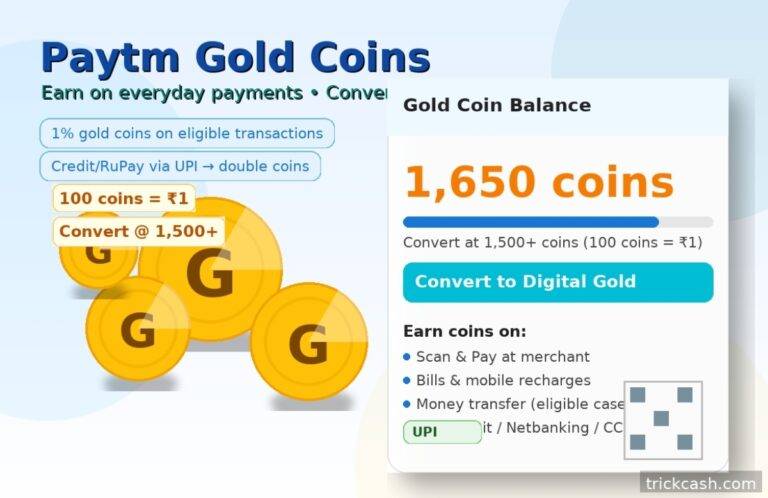
Paytm has introduced gold coins in a new way to reward its users on everyday transactions. When you use the Paytm app for payments such as scan & pay or do merchant payment, bill payment, recharge, or money transfer, then you can easily collect paytm gold coins rewards. Once you’ve successfully accumulated enough coins, you can convert them into digital gold payment with Paytm.
In this article I will guide you by explaining the full journey from earning to redeeming in simple steps, with no tricks, no false claims, and helpful for beginners as well as experienced Paytm users.
Related: Learn to sell digital stickers online
How Does the Gold Coins Program Work in Paytm?
- Earning Rate: Paytm Gold coins are credited at 1% of the transaction value.
- Double Coins Boost: If you pay using a credit card or a RuPay card via UPI, you can earn double gold coins on those eligible transactions.
- Conversion Value: for every 100 gold coins = ₹1.
- Minimum to Convert: Once you reach 1,500 gold coins, you can convert them to digital gold inside the Paytm app.
For example, if you pay ₹1000 for any bill payment by using UPI, net banking/debit card, 1% = 10 gold coins (worth ₹0.10).
If you pay the same ₹1000 by using a credit card via UPI/RuPay via UPI, the reward can be double (i.e., 20 gold coins = ₹0.20).
Important Note: You will get paytm gold coins rewards only if that transaction is eligible. Reward programs can change at any time. Always check the Gold Coin section in your Paytm app.
Eligible Transactions & Payment Methods
You can collect gold coins with these payment methods.
- Scan & Pay to any QR.
- Pay at merchants in shop stores, at petrol pumps, or during online checkout where Paytm is accepted.
- Mobile Recharge and Fastag Recharge (if eligible).
- Bill payments such as electricity, water, gas, broadband, DTH, etc.
- Double Coins: If the user pays by using a credit card via UPI or Rupay via UPI only on eligible transactions.
Note: Some categories or merchants may be excluded. Always review details in your Paytm app before paying.
How to Earn Paytm Gold Coin Reward (Step-by-Step)
Step 1: Firstly, download or update the Paytm app to the latest version from the official Google Play Store or Apple App Store.
Step 2: If required, complete KYC or refresh KYC, because rewards, digital gold, and certain payments will need KYC to work fully.
Step 3: Now choose an eligible payment option such as Scan & Pay, Merchant, Bill, Recharge, or Money Transfer.
Step 4: Pick your payment method, like UPI, credit card, or Rupay via UPI, to get double coins.
Step 5: Complete your transaction and earn coins. You will get gold coins as per the 1% base rate on every payment and double on scan & pay using a Rupay credit card as per eligible transactions.
Step 6: After you successfully complete payment, you will get a gold coin in the form of a scratch card.
Note: Paytm Gold coins may take up to 24 hours to update in your wallet.
How to Check Your Gold Coin Balance & Add a Home-Screen Widget
1. Open the Paytm application, then go to the home screen dashboard.
2. There, see if any widget or banner of Gold Coin is showing. If it is showing, then open it.
3. If you can’t see, then what do you do? Come to the Paytm application dashboard. Click on the search bar and type “gold coin” or “digital gold.”
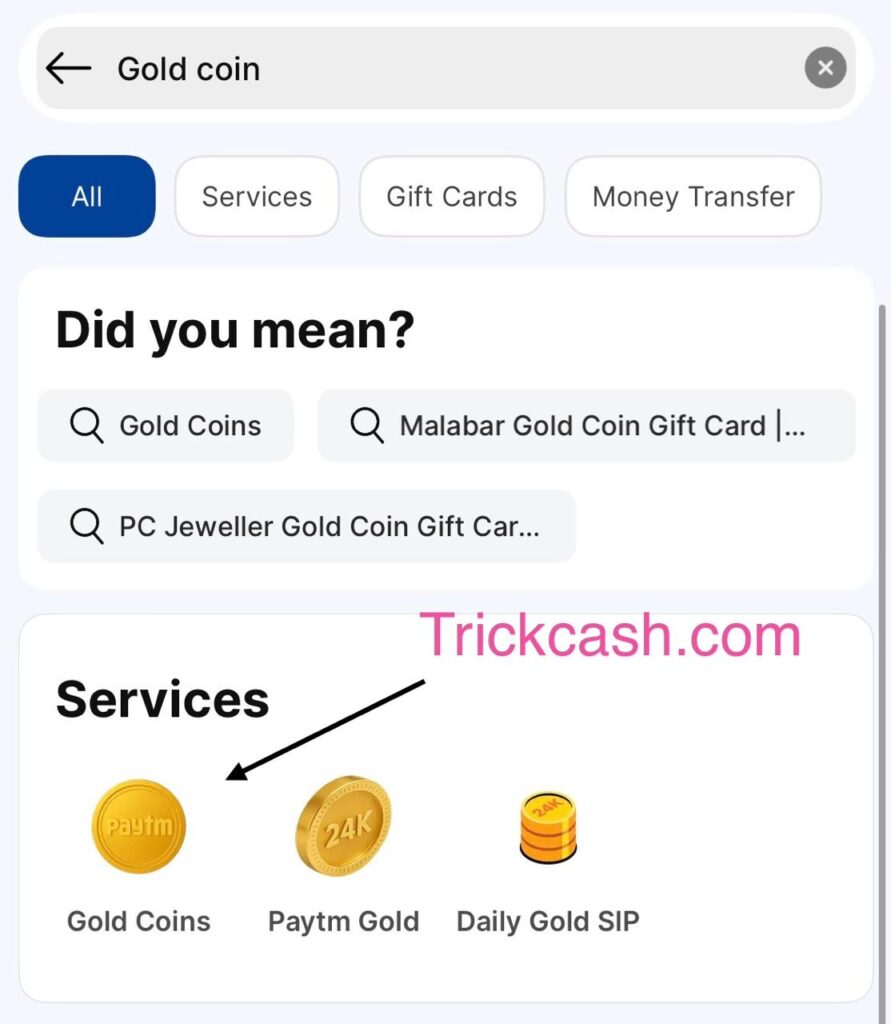
4. Now do you see how many total coins there are? recent transaction, minimum transaction requirement, etc.
Tips: If your smartphone supports widgets, you can pin the widget to your home screen and check your status in one tap.
Convert Paytm Gold Coins Rewards to Digital Gold Minimum, Rate & Steps
- Minimum Threshold: 1500 gold coins needed to convert.
- Conversion Rate: 100 gold coins = ₹1 (i.e., 1,500 coins = ₹15 digital gold).
Conversion Steps:
- First, confirm the coin balance reaches the minimum threshold and ₹ value.
- Go to the Gold Coin section.
- Tap Convert or Redeem to Digital Gold.
- On approval, your Digital Gold balance should update instantly or within 24 hours.
Real-Life Examples & Calculator: Table
Assumptions:
- Base gold earning rate = 1% of transaction
- It means 100 coins = ₹1.
- Double coins with RuPay via UPI (if eligible).
How many transactions to reach 1,500 coins?
• If you average 20 coins per transaction, you need around 75 transactions.
• If you average 40 coins (double), you need about 38 transactions.
Tips to Maximize Gold Coin.
- Always use the Paytm app for genuine monthly bills, recharges, shopping, and money transfers.
- Try to pay via credit card on UPI / RuPay on UPI to get double coins.
- Do not split one purchase into many small payments only to collect more coins because this can violate Paytm program terms and affect your account.
- Watch fees if you are using a credit card to pay your bill; otherwise, you will get less coin but more finance charges.
- The best method is to set reminders to pay bills on time with Paytm so you can earn coins without extra effort.
What are common issues while collecting gold coins?
1- Coins not credited immediately?
Guys, after a successful transaction, wait at least 24 hours. Some rewards may take time to show in your balance. If it still does not appear, then take a screenshot of the successful payment and contact the Paytm support team.
2- Gold Coin widget not visible in app?
Update your Paytm app to the latest version, and search for Gold Coin.
3- Transaction eligible but zero coins?
It could be due to an excluded category, a merchant, or it may have hit a cap limit.
4- Digital gold not showing after conversion?
For this, simply refresh, then check it again in the Gold Coin section. If still missing, raise a support ticket with the transaction ID and screenshot.
Paytm Gold Coins: Pros & Cons
- Users can earn gold coins when they pay with Paytm.
- 1000 coins = ₹10
- You can convert after 1,500 coins.
- Some payments made using a RuPay credit card via UPI may give double coins (when eligible).
Pros (Good Points)
- Earn on daily bills: mobile, electricity, broadband, electricity bill, recharges, and many merchant payments.
- No extra effort: You can easily earn coins on every payment.
- Easy to track: Check coins in the Gold section on the home screen dashboard.
- Clear value: 1000 coins = ₹10 makes it simple to understand.

Cons (Things to note)
- Value is small: For example, pay ₹2000 → 20 coins = ₹0.20. Double coins would be ₹0.40.
- Minimum redemption requirement needed: You must have to reach 1500 coins before converting.
- Not all payments count: Some categories or merchants’ QR codes may be excluded because there can be limits.
- Card costs: If you use a credit card and pay fees/interest, any coin value gets cancelled.
- Digital gold rules: When you convert, there can be buy/sell differences and market movement.
Who should use this?
- Good for those people who are already paying bills by Paytm and want a small extra without changing habits.
- Not ideal for anyone chasing big reward cashback or who might overspend just to earn coins.
- Safe tips
- Pay only real bills and do real shopping. Don’t split one bill into many small payments.
- Use double coins only if it’s free for you. Always repay your credit card in full.
- Check eligibility in the app before big payments.
- Convert after 1,500 coins so you don’t forget.
Frequently Asked Questions (FAQs)
Q1. What is the minimum to redeem gold coins?
You can convert coins once you reach 1500 gold coins. But I suggest you always check your app for the current threshold.
Q2. How much are my coins worth?
100 gold coins = ₹1 of digital gold value.
Q3. How do I get double gold coins?
To get double coins, you must use a RuPay credit card via UPI on eligible transactions.
Q4. Do coins expire?
Paytm specifies expiry rules in the app.Always check your Gold Coin section for any validity period. But an unclaimed scratch card is valid for 30 days from issuance.
Q5. Can I transfer gold coins to someone else?
Generally, gold coins are credited to your account and are not transferable.
Q6. Can I withdraw digital gold as cash?
Digital gold is not cash. Rest depending on provider terms & conditions.
Final Conclusion
Paytm Gold Coins Rewards turn routine payments into a steady bonus where the user can convert coins into real gold. Pay on eligible categories by using a credit card, UPI, etc., and track progress in the Gold Coin section. Moreover, you can convert coins once you cross 1500 coins.
I suggest treating coins as an extra bonus, not a reason to overspend money unnecessarily. Paytm program details can change, so always confirm rates in the app before paying.
Disclaimer: This article is for educational purposes only. Reward rates, eligibility, and conversion terms are controlled by the Paytm app and may change anytime. Always verify details within your Paytm app before transacting. Digital gold carries market risk and provider terms; consider your financial situation and seek professional advice if needed.